Multistream · macOS Beta
How to multistream for free from your Mac
One app, one encode, up to 5 destinations at 1080p30. No watermark, no trial, no cloud relay.
What you get free
5 destinations at once
YouTube, Twitch, X, TikTok, Instagram, or any RTMP server. Up to 5 live from one session on the macOS Beta, on every plan.
1080p30 at up to 6000 kbps
One encode leaves your Mac and every destination gets the same picture. The copies are made on your machine, so nobody bills you per platform.
Record while you stream
Local recording up to 2160p at 60 fps runs beside the stream. The file lands in your library the moment you stop.
Set up multistreaming in 5 steps
Every step happens in one window. The keys stay on your Mac, and nothing is uploaded to a relay.
- 01
Sign in and install the macOS Beta
Create a free account, download the signed build, and grant screen and microphone access when macOS asks. There is no trial timer to watch.
- 02
Add a destination card per platform
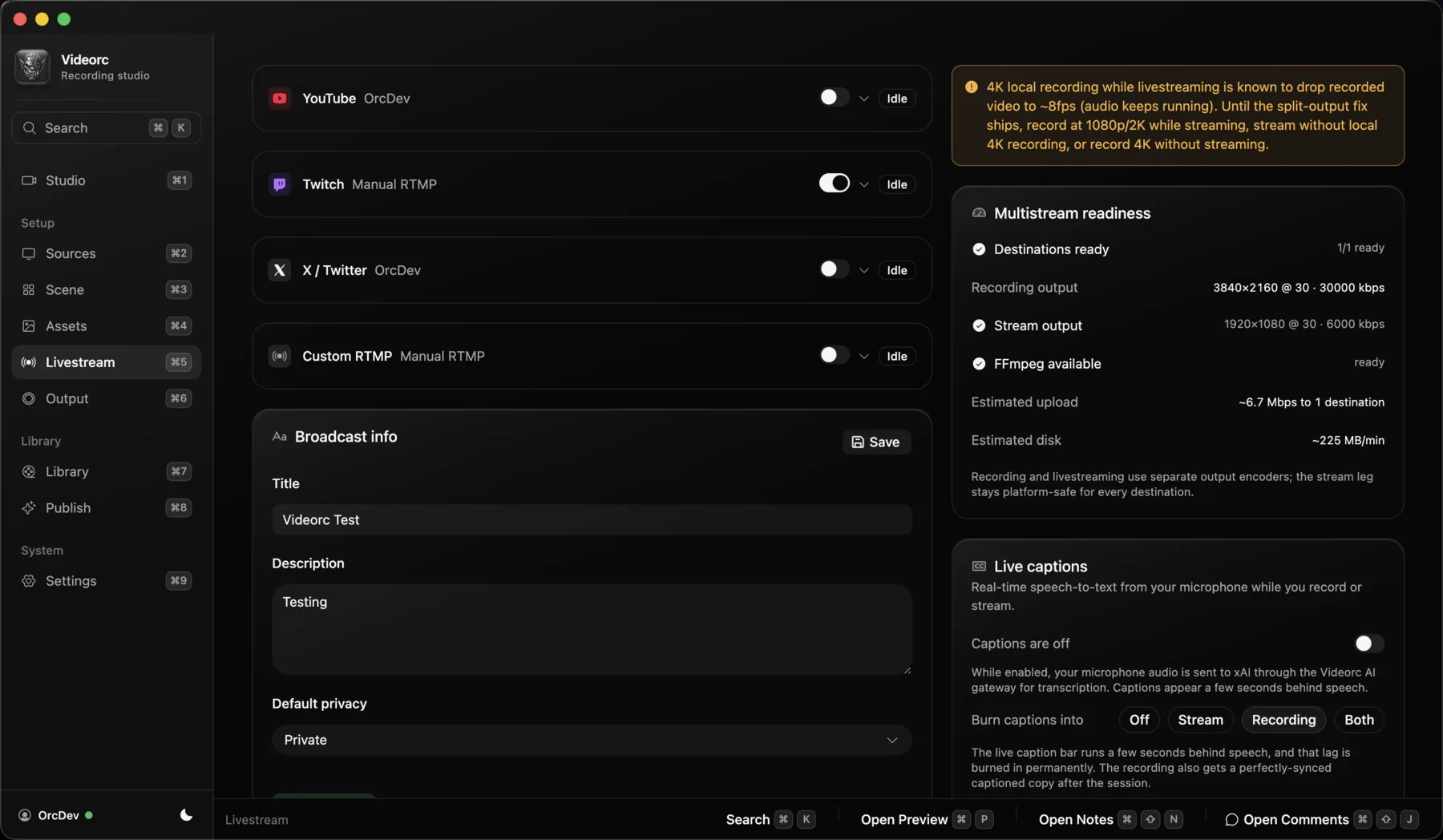
Open Livestream and add a card for each place you want to be live. Cards are independent: turn one off and the rest keep going.
- 03
Connect or paste a key
Twitch and X connect with one click. YouTube, TikTok, Instagram, and custom RTMP take a Server URL and stream key from that platform. Videorc keeps a backup of the previous key when you replace one.
- 04
Pick a scene and check the preview
Choose a layout, confirm the camera and mic in the native preview, and make sure the meter moves. What you see is what every destination gets.
- 05
Press Go Live
One button starts every card. The session panel shows per-destination health, and a single platform failing never stops the others.
What each platform needs
A destination exists only when the platform hands you ingest details. Videorc cannot mint a key a platform never showed you.
| Platform | How it connects | Worth knowing |
|---|---|---|
| YouTube | Server URL and stream key from YouTube Studio | Account connect is paused while Google reviews the app. Enable live on the channel first; YouTube waits 24 hours after the first enable. |
| Twitch | Login inside Videorc (OAuth) | Chat shows in the Comments window while you are live. |
| X | Login inside Videorc (OAuth) | Viewer counts and chat arrive in the Comments window. |
| TikTok | Server URL and stream key from LIVE Producer | LIVE Studio approval is not a stream key. TikTok decides who gets Producer. Why TikTok may not show a key |
| Server URL and stream key | Only where Instagram gives your account a Live Producer key. | |
| Any RTMP server | Server URL and stream key | Custom cards work for any platform that hands you standard RTMP ingest details. |
Free vs Premium
Premium never adds destinations. It raises the single-stream quality ceiling and pays for the server-backed tools.
| Free | Premium | |
|---|---|---|
| Destinations at once | 5 | 5 |
| Multistream quality | 1080p30 | 1080p30 |
| Single-stream ceiling | 1080p30 | 4K30 or 1080p60, where the platform accepts it |
| Bitrate ceiling | 6000 kbps | 30000 kbps |
| Live captions | No | Yes (early alpha) |
| Orcle, the live chat assistant | No | Yes (alpha) |
| AI publish tools | No | Yes |
All of the above is the macOS Beta. Windows Alpha lists streaming support per release; read the current Windows notes before assuming any of it. What Premium buys
How this compares to cloud multistream
Free multistream is not unique to Videorc. Restream Free stops at 2, StreamYard Free at 1, Streamlabs at one horizontal plus one vertical. Cloud tools cap early because each extra copy is their bandwidth. A desktop encoder makes the copies on your machine, so the cap can be 5 without a sales ladder.
Multistream questions
Anything else, write to orc@videorc.com. A person reads every single message.
Go live everywhere from one Mac.
Sign in, download the macOS Beta, and paste the keys you already have. Up to 5 destinations, free, from your own computer.