I launched Videorc on Product Hunt today. If you landed here from daily.dev, this is the useful version: what the app is, why it exists, how it is built, and what I am shipping next.
Videorc is an open-source desktop studio to record and go live everywhere at once. Free multistream to 6+ destinations. Available on Mac, Windows, and Linux.
TL;DR
- Videorc is a local-first desktop studio. One encode writes a file and copies out to the destinations you turn on.
- Free means local recording plus multistream to 6+ destinations at 1080p30 where the current build supports it. Fan-out happens on your computer.
- Mac is the established beta, and the most stable build. Windows and Linux are alpha.
- Premium is $39/mo, or $32.50/mo yearly. It adds live captions, Golem, and AI tools like Clean cut. Not more destinations. Not more quality.
- Golem is a one-of-a-kind, user-named on-stream AI companion that exists only in Videorc.
- Find us on Product Hunt by searching for "Videorc". Leave an upvote or a note if the app is useful.
What Videorc is
I got tired of paying a relay to copy one stream to a second platform, and I got tired of running a recorder and a browser studio with two start buttons.
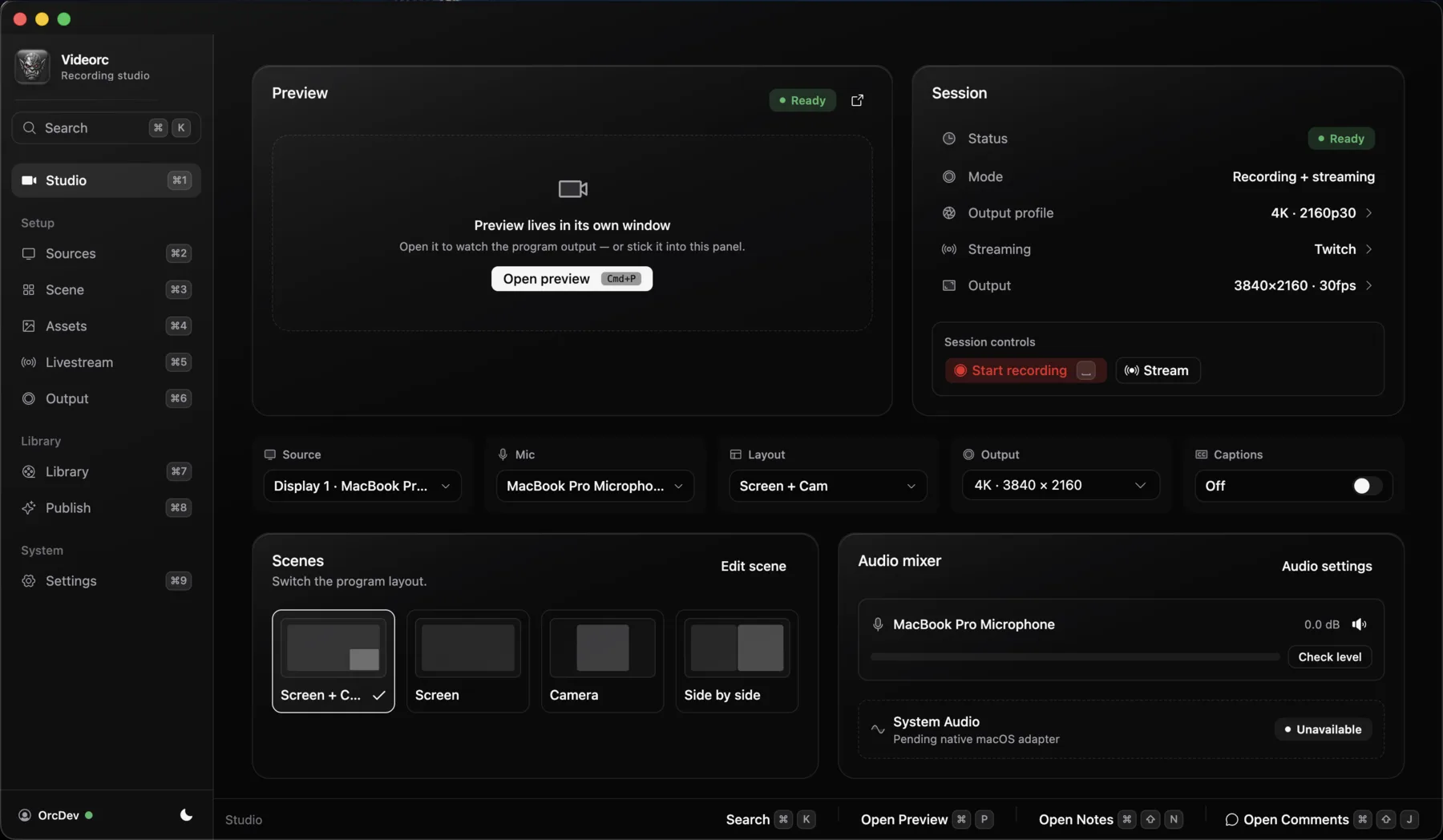
Videorc is a desktop studio. You build a scene, you press Go Live once, and the same encode writes a local file and copies out to the destinations you turned on. YouTube, Twitch, X, TikTok, Instagram, Kick, or any RTMP server.
Free is the product, not a teaser. Local recording and 6+ destinations stay free. A single stream can go up to 4K30 on YouTube on every plan. Multistreams stay at 1080p30 on every plan. Recordings stay on your machine.
Mac is the established beta. Windows 11 x64 and Linux (Ubuntu 24.04+, x64) are alpha. Check the download page for what the current build on your OS actually supports.
The copies leave from your NIC. Nobody bills you per platform. Upload speed and CPU are the real limits. Cloud relays sell the fact that you upload once.
Why I built it
Most "go live everywhere" products are cloud relays. You upload once. They copy. Each extra destination is their bandwidth, so free plans stop at one or two.
A desktop encoder can copy the stream on your computer. That is not a new idea. OBS plus a free multi-RTMP plugin already does it. I wanted the destination list to be a product, not a plugin I keep alive after every OBS update.
I also wanted the file and the live copies to be the same take. Two apps means two clocks. The cold open you wanted is the one where both were already running.
And I wanted an on-stream AI companion that is actually in the studio, not a browser tab you glance at. That is Golem.
The longer how-tos live in the multistream guide. This post is the launch note.
What's under the hood
Videorc is open source. The desktop app is a native studio: capture, compose, encode, and fan-out on the machine in front of you. The site you are reading is the Next.js account portal. The encoder and the live session live in the desktop.
A few things that shipped recently, from the changelog, not from a pitch deck:
YouTube connect. Google approved the app. In Livestream setup you can connect YouTube the same way you connect Twitch or Kick. Videorc creates the broadcast, sets the title from Broadcast info, shows YouTube chat, and lets you schedule a stream. Manual RTMP is still there if you want it.
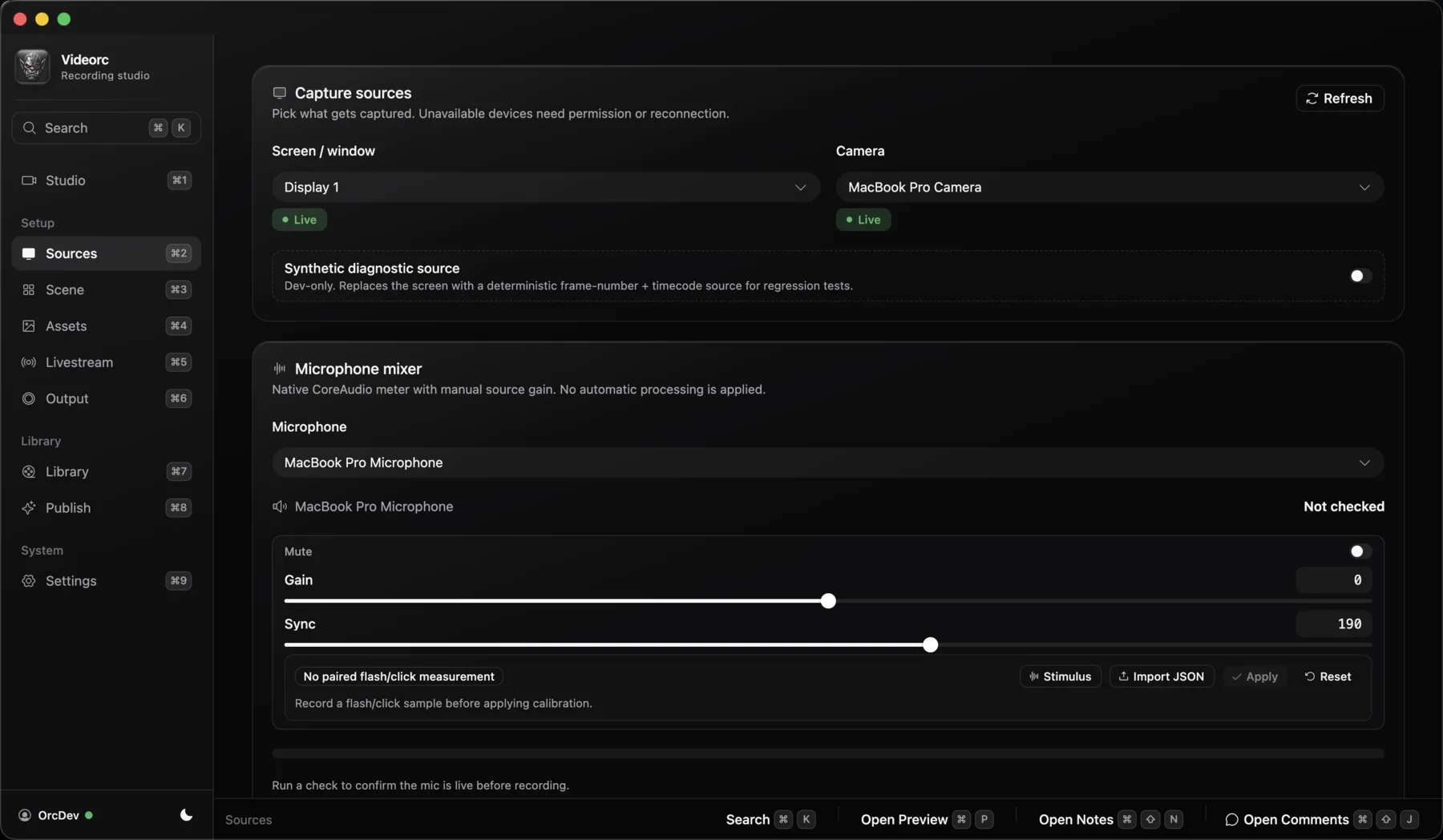
Sources mixer. Sources has a real audio mixer: a channel strip, level meter, and fader per source, plus mute and a Sync slider. The microphone has a Gain fader. System audio has its own Level fader and a meter while you record or stream.
Destinations and chat. Twitch, X, and Kick connect in the app. YouTube connect is live. TikTok and Instagram still want a Server URL and stream key. Chat that Videorc already shows (YouTube, Twitch, Kick, X) feeds the Stream Manager.
Windows and Linux alpha. The Mac beta is still the most complete build. Windows and Linux are public alphas with their own release notes. Do not assume feature parity.
One encode. Multistream copies leave from your computer. Upload is yours. Five destinations at the free 6000 kbps ceiling want about 30 Mbps of steady upload plus headroom. Wired beats Wi-Fi.
The source is public at github.com/TheOrcDev/videorc. Walkthroughs live on the official channel, youtube.com/@VideorcApp.
Golem, and the rest of Premium
Golem is a one-of-a-kind, user-named on-stream AI companion. It exists only in Videorc. You will not find it in OBS, Restream, or StreamYard.
It sits with you in the Stream Manager. It watches live chat, groups questions, flags toxicity and spam, and takes voice commands when you ask. It never posts on its own. It never bans on its own. It removes a comment only when you tell it to.
I used to call it Orcle. The name is Golem now. Same companion, the name you give it.
Premium is $39 a month, or $32.50 a month if you pay yearly. It adds:
- Live captions (early alpha), burned on the stream, plus a synced .srt on the recording
- Golem
- AI tools like Clean cut (silences, ums, and retakes removed after you stop)
- Noise cleanup on your computer
Premium does not buy more destinations. Premium does not buy 4K. Multistream stays at 1080p30 on every plan. A single YouTube stream can already go 4K30 for free.
It is not a generic chatbot taped onto a studio. You name it. It sits on the stream with you. That companion does not exist in any other app.
What's next
Product Hunt is a launch day, not a finish line.
I am hardening the Windows and Linux alphas toward the Mac beta. I am keeping YouTube connect honest as Google's quotas and reviews move. Golem will keep getting better at the job it already has: sit with you on stream, under the name you gave it.
If something is broken on your OS, I want that report more than I want a compliment.
How to find us today
Go to Product Hunt and search for "Videorc". Upvote if the app is useful. Leave a comment if it is not.
The official YouTube channel is youtube.com/@VideorcApp. Setup walkthroughs live there.
The source is public on GitHub at TheOrcDev/videorc.
Per-platform keys and the free versus Premium table live in the multistream guide.
FAQ
What is Videorc?
An open-source desktop studio to record and go live everywhere at once. Local recording and multistream to 6+ destinations are free where the current build supports it. Videorc is available on Mac, Windows, and Linux.
Is Videorc free?
Yes. Local recording and multistream to 6+ destinations at 1080p30 are free. A single stream goes up to 4K30 on YouTube on every plan. Fan-out stays on your computer.
What does Premium add?
Live captions, Golem, and AI tools like Clean cut. The paid plan is $39/mo, or $32.50/mo yearly. Destinations and quality stay the same on every plan.
What is Golem?
Golem is a one-of-a-kind, user-named on-stream AI companion that exists only in Videorc. It watches chat, flags problems, and takes voice commands when you ask. It never acts on its own.
Does this work on Windows and Linux?
Yes. Videorc is available on Mac, Windows, and Linux. Mac is the established beta, and the most stable build. Windows and Linux are alpha. Check the download page for the current build on your OS.
How do I find Videorc on Product Hunt?
Go to Product Hunt and search for Videorc. I am not linking a product page here. If the app is useful, an upvote and a comment help more than a star I cannot see.